Mixing, Routing, Processing, Recording

FusionDesk

A Windows software mixer that turns any application into a mixer input and runs VST3 plugins isolated from the audio path, so a plugin crash can't take your sound down. Route, process, record and monitor across ASIO and Windows Audio, with MIDI instruments played live into the mix.

Now in Beta-3

The Mixer

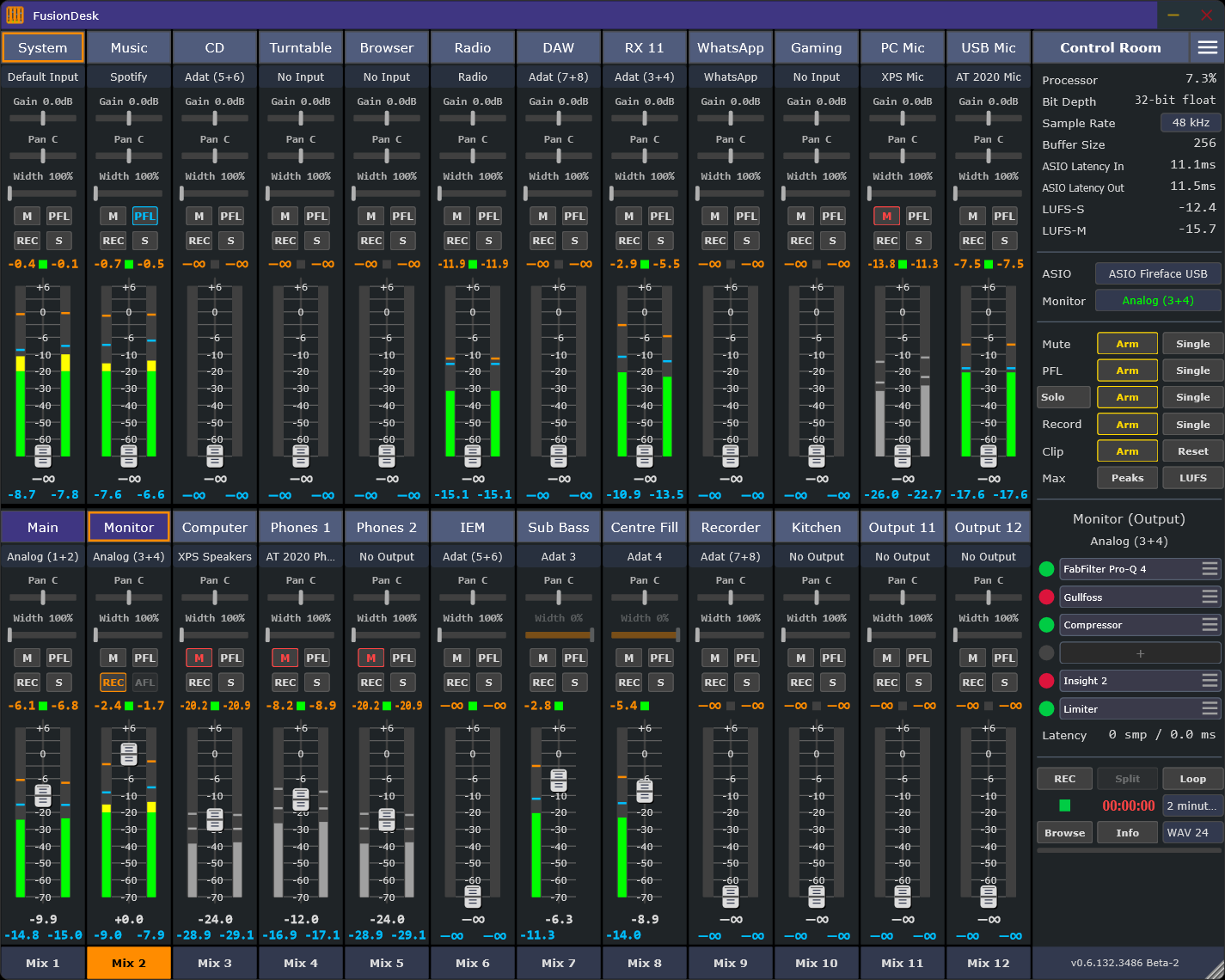
A 32-channel mixing console, everything in one view.

Input strips, output strips, mix buttons, plugin slots, meters, recording controls, and the Control Room stay on one screen so routing decisions remain visible. A serious stereo mixing console at its core - designed so you can see the whole signal path at a glance.

FusionDesk mixer interface showing input strips, output strips, meters, VST slots, mix buttons, and the Control Room panel.
FusionDesk with input and output strips, active mixes, VST insert slots, metering, and recording controls.
32 x 32
stereo channels
32
independent mixes
24
band parametric EQ
32-bit
float mix bus

Routing Without Hardware Lock-In

Build every mix from one shared set of sources.

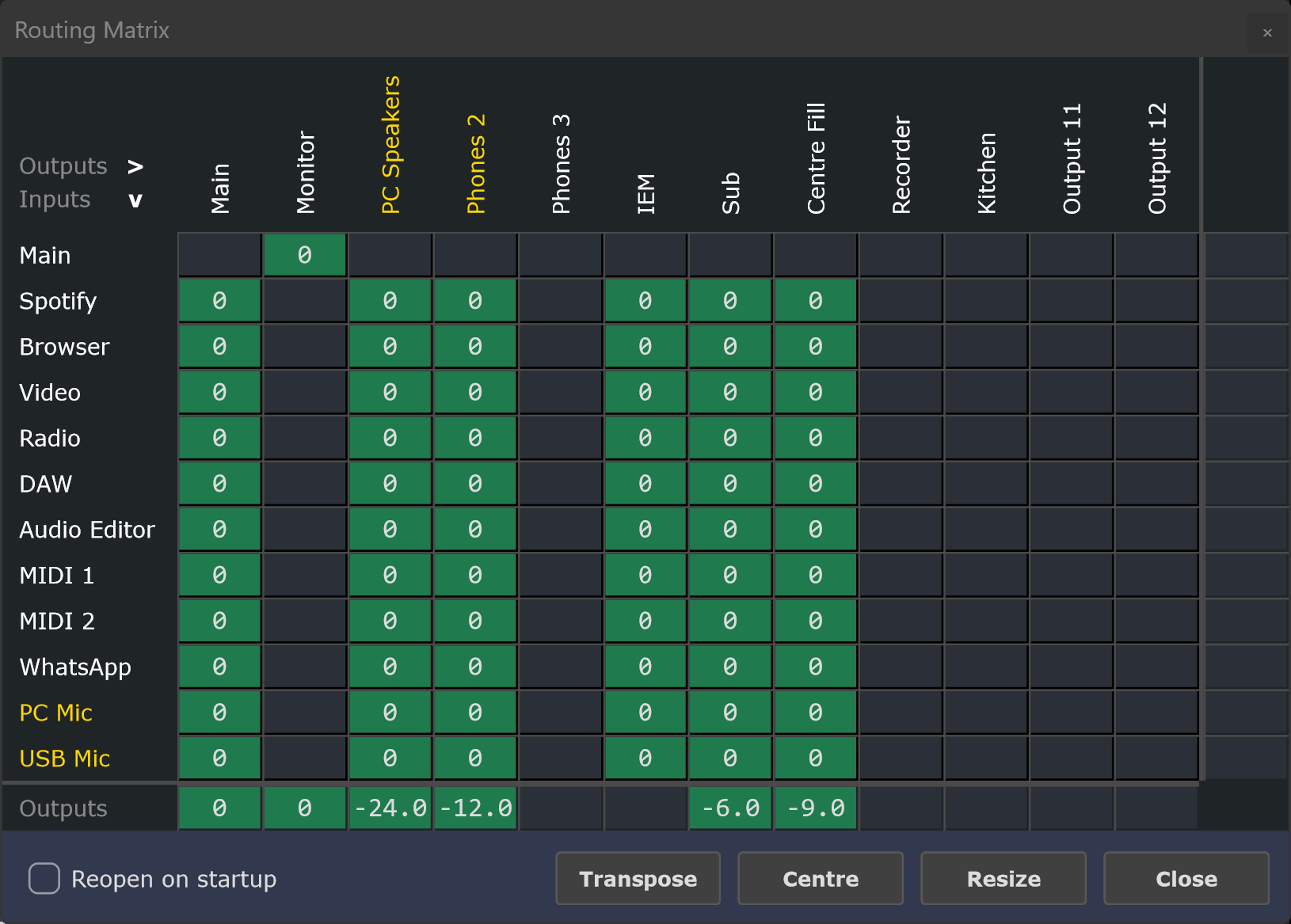
Inspired by the matrix-mixer workflow of RME TotalMix FX: create up to 32 independent stereo mixes from one set of inputs, send them wherever they need to go, and keep the whole session visible - across professional ASIO interfaces, standard Windows devices, virtual audio drivers, and captured applications, all in one place. A dedicated Matrix View shows every channel against every mix as a crosspoint grid, so you can see and edit the entire routing picture at once.

FusionDesk Matrix View showing a crosspoint grid of every input channel against every mix, with an output master row along the bottom.
Matrix View - every channel against every mix as a crosspoint grid, with an output master row.
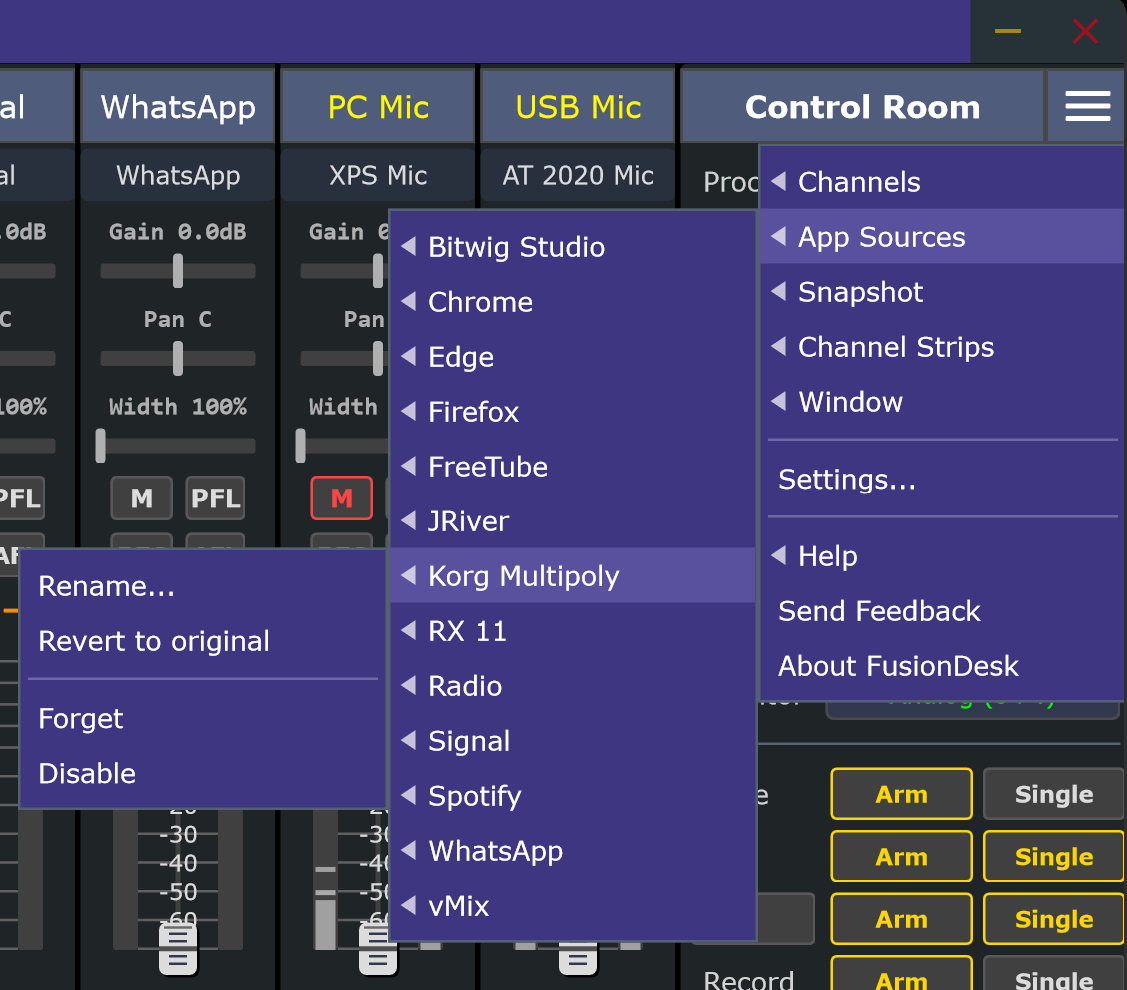
FusionDesk App Sources menu showing captured applications including Bitwig Studio, Chrome, Firefox, Spotify, WhatsApp, and vMix.
Captured applications appear alongside hardware inputs, ready to route.

Per-Application Audio Capture (PAC)

Any app becomes a mixer input.

Browsers, games, calls, players

Capture browsers, media players, DAWs, messaging apps, and games separately, then decide exactly what each destination hears.

No extra software

Something the utilities bundled with audio interfaces generally can't do - built directly into the mixer.

Routed like any input

Level it, EQ it, send it to any mix, and record it - the same as a hardware channel.

Built-In Processing

A full processing suite, before you load a single plugin.

Loads like a plugin

Native processors drop into any input or output slot just like a VST3 - with no plugin-host overhead.

Saves with the session

They store with sessions and snapshots, and travel when you copy a channel's chain.

Interactive and metered

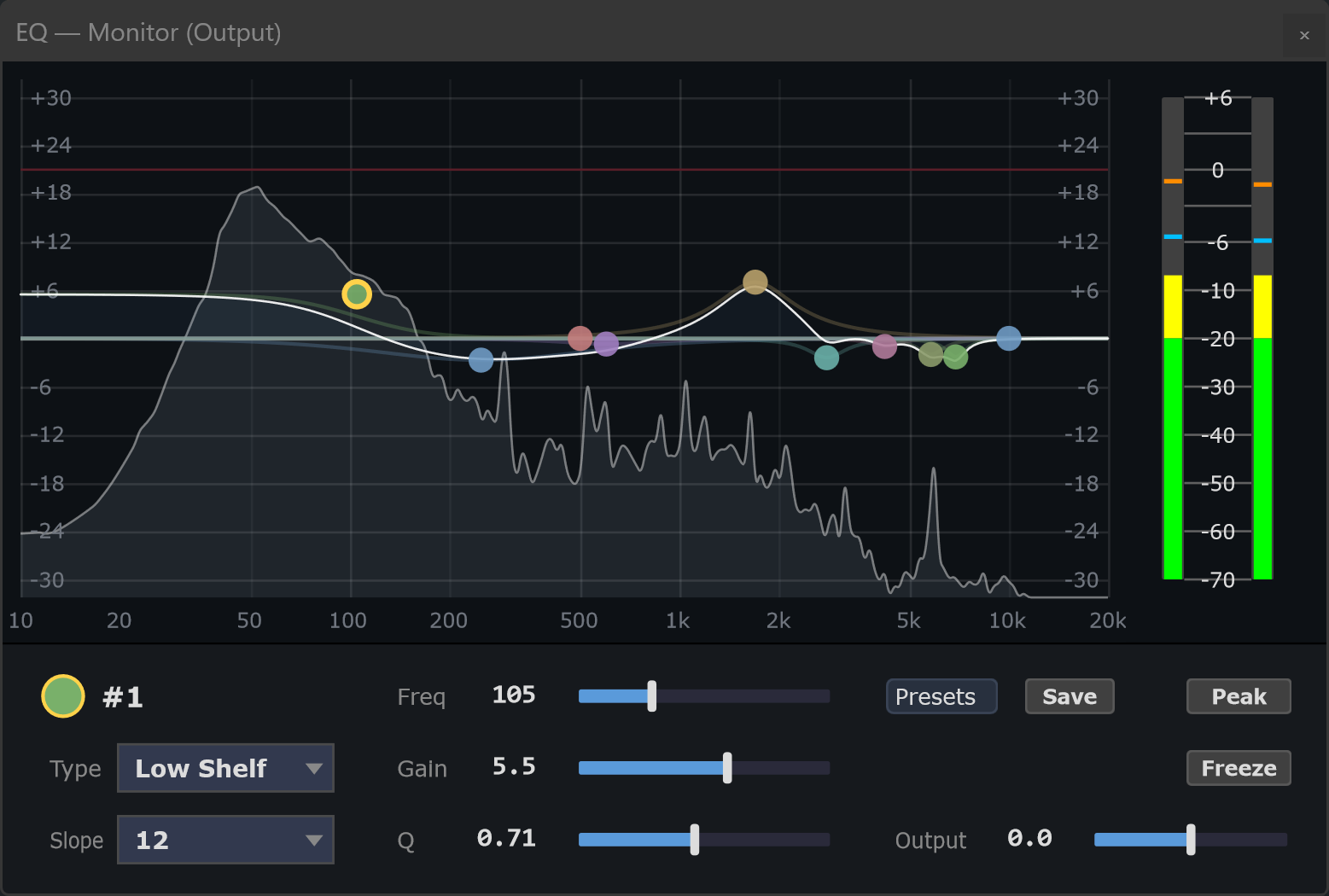
An EQ curve with a live spectrum analyser, dynamics with gain-reduction history - built to be read at a glance.

FusionDesk parametric EQ showing an interactive response curve with multiple coloured band points, a live spectrum analyser behind it, and output meters.
The native parametric EQ - an interactive response curve with a live spectrum analyser behind it.

Parametric EQ

Up to 24 bands - Bell, Shelf, Cut, All Pass, Band Pass, Tilt - edited on an interactive curve from 10 Hz to 20 kHz, with a live spectrum analyser behind it. Bypass any band with a right-click, type frequencies as musical notes, and recall Factory or User presets in one click.
Compressor and Limiter

Native dynamics with strip-style gain-reduction metering and a scrolling history graph that shows level and reduction over time - so you can see the compressor catching transients or the limiter just kissing the ceiling. The compressor can sidechain to any other input or output for classic ducking, and the limiter has a variable attack. Reset every control to its factory value in one click.

Tone Generator

Seven waveforms - Sine, Triangle, Square, Saw Up, Saw Down, White and Pink Noise - for line-up, calibration and testing. Set frequency, level, and a mix to blend the tone over the channel or replace it entirely.

Alignment Delay

A pure time delay from 0 to 2000 ms - no echo, no effect - to line a channel up against other feeds. Time-align subs to the mains, correct lip-sync, or align a delay tower, with coarse and fine controls and a samples readout.

Plugin Management

Pick from four searchable columns - Favourites, Effects, MIDI Instruments, and Ignore. Load native processors or third-party VST3s, star the ones you reach for, and hide the ones you never use.

Reliability

A plugin can crash. Your audio doesn't.

Third-party VST3 plugins run isolated from the mixer. If one crashes or hangs, FusionDesk bypasses it and keeps the sound flowing - then lets you reload the slot without restarting. Plugins crash, drivers hang, shows run long; none of it takes your sound down.

Protected Audio Path

The audio stream is defended on every side: denormal numbers that can spike CPU on near-silent signals are handled automatically, diagnostics only ever write between the audio - never in the middle of it - and a faulting plugin drops to clean pass-through.

Live Performance Mode

For shows, a single mode hardens FusionDesk against mid-set surprises - including pausing diagnostics writes - so nothing competes with audio while you're on.

Pro Audio Scheduling

Plugin processing registers with Windows' Pro Audio scheduling - the same class your ASIO driver uses - so it's far less likely to glitch when other software keeps the computer busy.

Plugin Health

See which plugins have crashed this session and how often, so you can spot an unreliable one at a glance. A crashed plugin is bypassed automatically while audio keeps flowing.

Diagnostics

When something does go wrong, you get answers.

Flight Recorder

An always-on, plain-language log of each session - device changes, plugins loaded, crashes, audio stalls, clips, MIDI and recording activity, snapshot saves. It runs automatically and costs nothing while idle, and you can read it right inside FusionDesk - colour-coded by severity, filtered to just the errors when that is all you want, with a live view that follows events as they happen.

Readable Crash Reports

If FusionDesk ever closes unexpectedly, it writes a companion text file with the version, the error, and the last events - so a crash comes with the story of what led up to it.

Export Diagnostics

One click gathers logs, crash reports, settings and plugin history into a single dated zip you can email. It works entirely offline, and your Windows user name is removed automatically.

Recording Confidence

Check disk usage, recording rate, remaining time, and estimated full date before committing to a long take - so a long recording never runs out of room by surprise.

Play, Don't Just Mix

Play VST3 instruments, live, inside your mix.

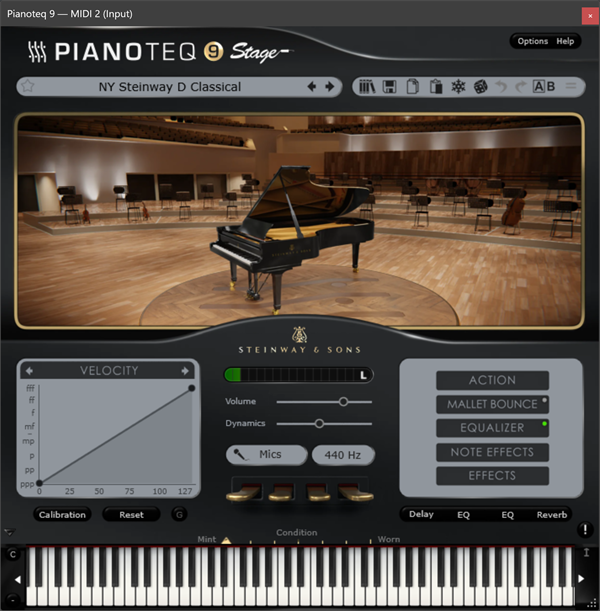
Load a VST3 instrument plugin onto any input channel and play it live - from your computer keyboard or one or more MIDI controllers - straight into your mix. No project to set up, no separate DAW to launch just to play an idea.

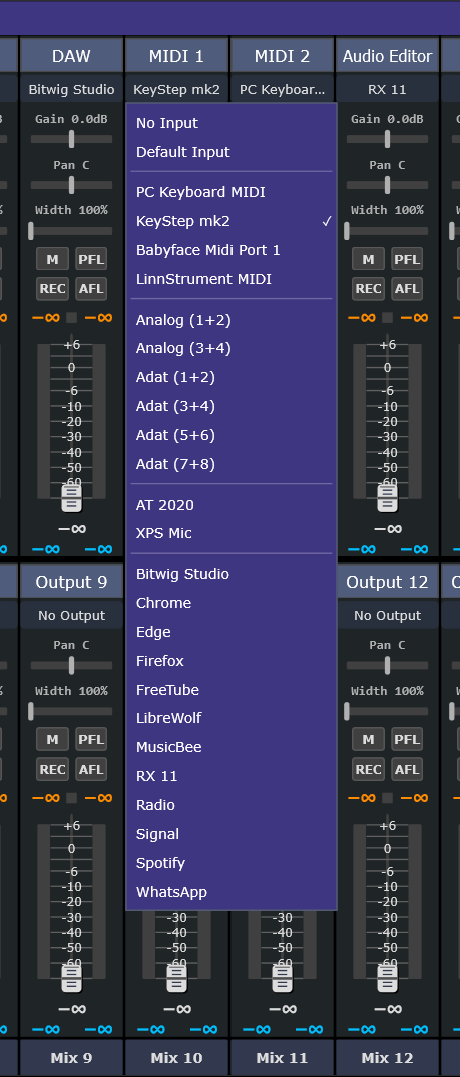
A FusionDesk channel's input menu open, showing a MIDI Inputs section - PC Keyboard MIDI plus connected controllers such as a KeyStep and a LinnStrument - listed above the audio devices.
MIDI sources in a channel's input menu - the computer keyboard plus any connected controllers, selectable per channel.

PC Keyboard or MIDI Controllers

Choose the computer keyboard or a connected controller from a channel's input menu and play. The computer keyboard is polyphonic - hold a full chord, limited only by your keyboard's key rollover. One or more controllers can drive several instruments across different channels at once, each playing independently.

Capture the Take

What you play runs through the same channel and mix as everything else, so you can record the performance with the built-in recorder.

Played at ASIO Latency, In Time

Because FusionDesk already runs at the low buffer sizes live work needs, instruments feel immediate - the same low-latency path your audio takes. Set a global tempo and instruments with tempo-synced arpeggiators, delays, or LFOs follow it.

A software grand-piano instrument running inside FusionDesk - the window title reads MIDI 2 (Input), showing it is hosted on a FusionDesk channel and played from a MIDI input.
A VST3 instrument hosted on a channel and played from a MIDI input (note the channel name in the title bar). Third-party instrument shown for illustration.

Control Room

Everything you monitor with, in one panel.

Listen and solo

PFL, AFL and Solo with per-channel exclusivity, on a dedicated listen output separate from your main mix.

Monitor processing

Run the monitor VST chain on the Listen bus or the Mix - so headphone EQ or room correction can shape what you hear without touching your recordings.

Status at a glance

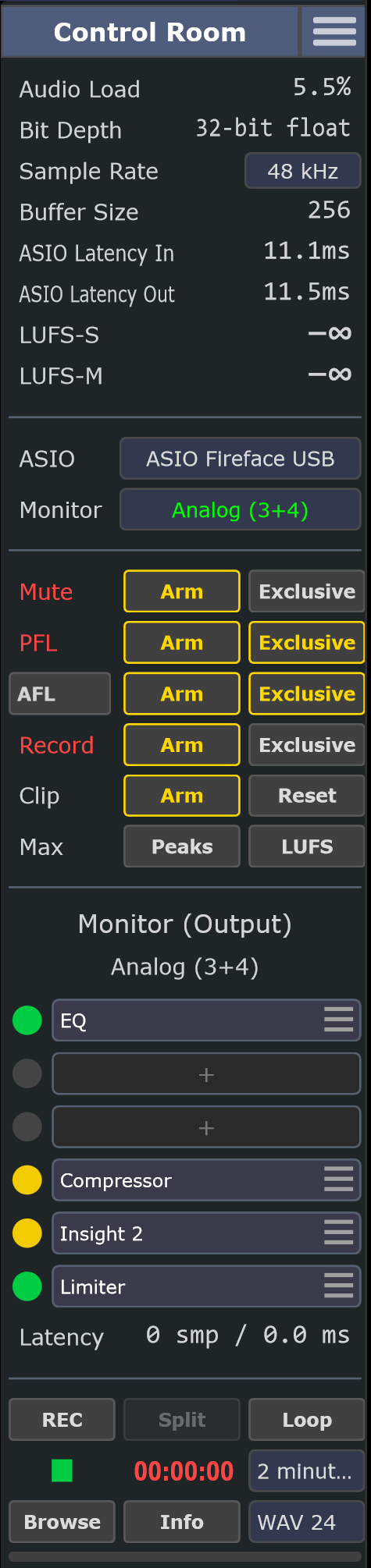
Audio Load, sample rate and buffer, ASIO latency, LUFS-S/M, clip holds and the recording transport - always in view.

Recording, isolated per channel

Arm any channels and each one records to its own file - isolated tracks (ISOs) you can re-balance and re-process afterwards, because the input tap sits before the channel's plugin chain. Arm an output at the same time and you also capture the finished mix as it went out. Record to WAV, FLAC or MP3, split a long take into segments without stopping, or keep a rolling loop buffer so you can export the last few minutes after they happen.

FusionDesk Control Room panel showing Audio Load, bit depth, sample rate and buffer, ASIO latency, LUFS metering, device and monitor selectors, Mute/PFL/AFL/Record arm rows, the monitor processing chain, and recording transport.
The Control Room panel - status, monitor selection, listen bus, monitor processing, and recording transport in one column.

Audio Quality

Transparent by design.

FusionDesk runs a 32-bit floating-point mix bus with constant-power pan law, calibrated RMS, LUFS and True Peak (dBTP) metering, and adaptive resampling for asynchronous Windows audio sources.

Frequency Response
20 Hz to 45 kHz at 96 kHz, ruler-flat
THD+N
0.0009% through the digital signal path; analogue I/O results depend on your interface
Phase Integrity
Stereo null across the full audio band
True Peak
dBTP metering catches inter-sample overs a sample-only meter misses

Performance and Scale

Built for big sessions.

FusionDesk uses your whole CPU and keeps large, dense setups workable on the screen you actually have.

Parallel Plugin Processing

Channels are independent, so their plugin chains process simultaneously across your CPU's cores. In testing, a 96-plugin session ran cleanly at a 512-sample buffer, and testers have reported sessions well beyond 100 plugins. It's automatic, with nothing to configure.

Bank View

When you have more channels than fit across the screen, Bank View pages them into equal groups - 4 banks of 8 to 2 banks of 16 - with inputs and outputs always lined up. Every channel keeps running in every bank; only what's on screen changes.

Ready in Seconds, Changed Without Restarting

FusionDesk opens in a couple of seconds even with a large plugin collection installed, because plugins are scanned in the background rather than blocking the start. Audio device, sample rate and buffer size all change live, so setting up is a matter of trying something and hearing the result - not restarting between each attempt.

Use Cases

Built for practical Windows audio rigs.

Audiophile Stereo Listening

Get the best from a two-channel system: switch between DACs and headphone amps, A/B sources instantly, and apply per-output EQ to voice each pair of speakers or pair of headphones to taste.

Studios and Musicians

Build headphone mixes, route DAWs and media players, insert room correction or headphone EQ, play instrument plugins live from a keyboard or controller, and save complete setups as snapshots.

Live Mixing and AV Work

Mix a show from one screen: Main and Monitor mixes, recording feeds, and utility routing side by side. Host effects and instruments in a crash-isolated sandbox so a misbehaving plugin can't take the show down, and switch on Live Performance mode to harden everything against mid-set surprises.

Livestreams and Content Creation

Capture microphones, browsers, games, music players, guests, and comms apps separately, then decide exactly what each destination hears.

Multichannel and Surround

Build a surround or multichannel setup by hand: route each source to the speakers you choose - 5.1, 7.1, or a custom array - and place, level, delay and EQ on every channel individually. You mix it manually; FusionDesk gives you the routing and per-output control to do it.

Voice and Video Calls

Send selected audio sources into a messaging or conferencing app during a call while keeping your own monitor mix separate.

Current Release

FusionDesk Beta-3

FusionDesk is in active beta. The core mixer, routing, metering, snapshots, recording, VST3 hosting, native compressor and limiter, and device management are functional and ready for real-world testing.

Read the Beta Notes

Requirements

  • Windows 10 2004+ or Windows 11, 64-bit
  • ASIO recommended for low-latency operation; Windows Audio, Dante Virtual Soundcard, and ASIO4ALL setups are welcome in beta testing
  • Windows 11 or Windows Server 2022 required for App Capture

Stay in the Loop

Get notified at launch

FusionDesk is in active development. Leave your email and we will let you know when it is ready. Tell us how you would use it if you like — it helps shape what we build.

Beta Focus

What we are testing now.

FusionDesk is ready for focused feedback from home, project, streaming, and studio setups, especially where drivers, plugins, App Capture, and long sessions meet.

Routing Reliability

ASIO device changes, multi-output mixes, monitor routing, snapshots, and session restore across real interfaces.

Application Capture

Browsers, DAWs, media players, games, streaming tools, and communication apps routed as independent mixer sources.

Plugin Hosting

VST3 scanning, favourites, editor windows, preset restore, native dynamics, and recovery from unstable plugins.

Recording Workflows

Input and output recording, long takes, loop capture exports, file formats, and disk-space confidence checks.

Beta Testing

Request a Beta

FusionDesk Beta-3 is ready for a wider round of Windows audio testing. If you make, monitor, stream, route, record, or process audio on Windows, your feedback is useful, whether you are experimenting at home or working in a professional studio.

Helpful details, if you know them

  • First name
  • Windows version
  • Audio interface or sound device, if any
  • How you plan to use FusionDesk
  • Important apps, plugins, or audio workflows